Skip to content
ExifTool.net

Online EXIF Data View, Remove and Edit

Online images, PDFs, documents, audio and video metadata viewer, Remover and Editor

Cleaning options

Nothing here yet — add a file to begin.

How it works

How to view EXIF data online

Four simple steps. Everything runs in your browser, so your files never leave your device.

  1. Step 1

    Upload your file

    Drag a photo, PDF, document, audio or video file into the lab, or tap Choose files to pick one from your device. You can also paste an image straight from your clipboard.
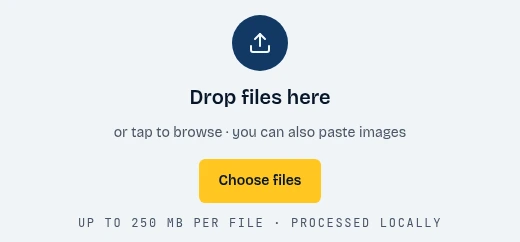
    The ExifTool.net drop zone with the Choose files button highlighted
    1. Click Choose files
  2. Step 2

    Show the data

    The report opens instantly. Browse every field by group, search for a value, and check the privacy exposure score to see how much the file reveals about you.
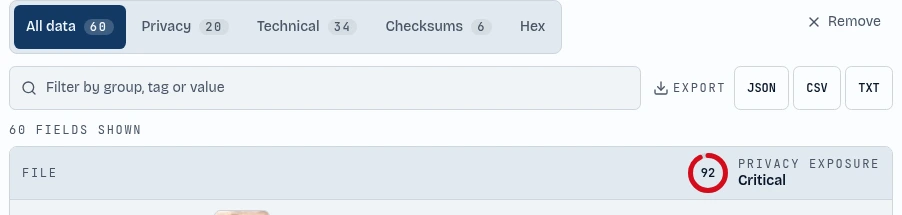
    The metadata report tabs and the privacy exposure score highlighted
    1. Browse every field
    2. See your privacy score
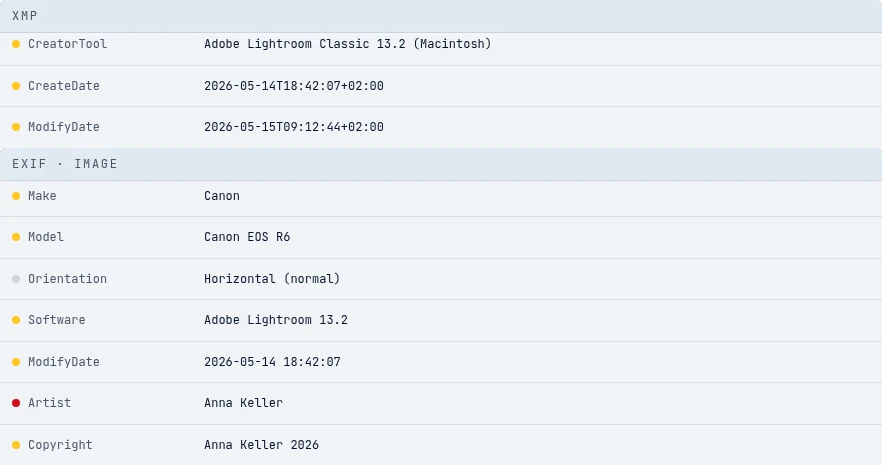
    The XMP and EXIF Image groups in the metadata report listing the editing tool, dates, camera and author
    1. XMP
    2. EXIF Image
  3. Step 3

    Remove Exif Data

    Press Clean file and the metadata is stripped in one tap. The tool then verifies that no fields remain, so you can share the file safely.

    The Clean file button highlighted below the fields found counter
    1. Strip all metadata
  4. Step 4

    Exif data editor

    Want to keep some details? Press Edit EXIF, change the title, author, location or dates, and save the file with your own values.
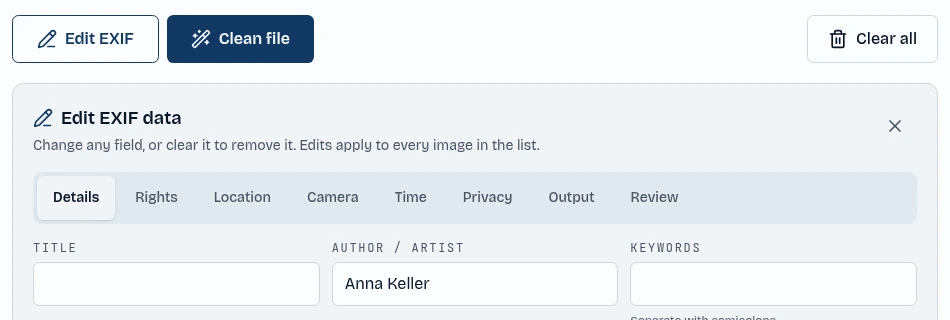
    The Edit EXIF button and the author field in the editor highlighted
    1. Open the editor
    2. Type a new value

About the tool

Online EXIF Data Viewer

An online EXIF data viewer lets you see the hidden information stored inside a file without installing any software. Every photo you take with a phone or camera carries EXIF metadata: the exact date and time, the camera make and model, lens and exposure settings, and often the GPS coordinates of where the picture was taken. PDFs, Office documents, audio and video files hide similar details, such as author names, software versions and edit history.

ExifTool.net is a free online EXIF viewer, remover and editor that reads all of this metadata directly in your browser. Open any JPG, PNG, WebP, PDF, DOCX, XLSX, PPTX, MP3, MP4 or MOV file and you get a complete, searchable report grouped by category, with a clear privacy score that shows how much the file reveals about you.

Because the file is processed locally with JavaScript, nothing is uploaded to a server. That makes it safe to inspect private photos, client documents and sensitive recordings, and it works on desktop, tablet and mobile. When you are done, you can edit the fields, remove the metadata completely, or just copy the information you needed.

Features

Features of ExifTool.net

Everything you need to view, edit and remove metadata, in one private workspace.

View all EXIF and metadata

See every EXIF, XMP, IPTC, ID3 and file property in a filterable report, grouped into privacy, technical and checksum views.

Remove metadata permanently

Strip GPS, serial numbers, authors, timestamps and thumbnails in one click, then verify that the cleaned file is really clean.

Edit EXIF data

Change the author, copyright, description, camera details, dates and GPS position, or clear any field you do not want to share.

100% private, no uploads

All parsing and cleaning runs in your browser tab. Your files never touch a server, and there is no account or sign-up.

Images, PDFs, documents, audio and video

Works with JPG, PNG, WebP, PDF, Word, Excel, PowerPoint, OpenDocument, MP3, WAV, FLAC, MP4, MOV and many more formats.

GPS location and map link

Spot precise coordinates instantly, open them on a map, blur the precision to a wider area, or remove the location entirely.

Privacy exposure score

Every file gets a simple score from none to critical, so you know at a glance which files are risky to share.

Batch processing and ZIP export

Drop many files at once, clean or edit them together, and download everything as a single ZIP archive.

Checksums and hex view

Compare hashes before and after cleaning and inspect the raw bytes of the file header and footer for a deeper check.

Export reports

Download the full metadata report as JSON, CSV or TXT, or copy individual values straight to your clipboard.

Free and mobile friendly

No limits, no watermark and no cost. The touch friendly layout works smoothly on phones, tablets and desktops.

Available in 15 languages

Use the tool in English, Spanish, French, German, Arabic, Portuguese, Italian, Dutch, Russian, Turkish, Japanese, Korean, Chinese, Hindi or Indonesian.

FAQ

Is my file uploaded anywhere?

No. ExifTool.net processes everything locally with JavaScript in your browser. Your files never leave your device.

Will cleaning reduce image quality?

No. The standard mode rewrites the file structure without touching pixel data. Only the optional deep clean re-encodes the image.

Why keep orientation by default?

Phones store rotation as metadata. Removing it can make portrait photos appear sideways, so we keep only that single flag unless you turn it off.

Which formats are supported?

JPG, PNG, WebP, GIF/BMP/AVIF (via re-encode), PDF, DOCX, XLSX, PPTX, ODT/ODS/ODP, audio in MP3, WAV, FLAC, OGG, Opus, AAC, M4A, AIFF, WMA, MKA, CAF, AU, DSF, APE, WV and more, plus MP4, MOV and M4V video.

What about HEIC photos?

Browsers cannot decode HEIC reliably, so we ask you to convert to JPEG first rather than risk a broken file.

Does it work for large files?

Yes, up to 250 MB per file. Video cleaning edits metadata in place, so it is fast even for big clips.